
Creator comparison 2026
Seedance 2.5 vs Veo 3.1: Which AI Video Generator Wins for Creators?
Seedance 2.5 and Veo 3.1 are both high-end AI video models, but they solve different creator problems. This comparison looks at availability, clip length, 4K output, references, audio, editing, pricing, and real output tests.

Comparison focus: This guide puts access, native clip continuity, reference capacity, audio, and publishing readiness side by side so teams can choose a practical production path.
Quick Verdict
For creators comparing Seedance 2.5 with Veo 3.1, the practical answer is workflow-based. Choose Seedance 2.5 when a finished clip needs to stay coherent for longer. Choose Veo 3.1 when immediate access, Google tooling, and cinematic realism are the priority.
- Best for production continuity
- Seedance 2.5Better for 30-second creator clips, product ads, reference-heavy campaigns, and fewer stitched transitions.
- Best for immediate access
- Veo 3.1Better for teams already using Google tools, per-second API billing, and cinematic realism benchmarks.
- 01Seedance 2.5 is built around a native 30-second single-take generation workflow; Veo 3.1 starts with shorter base clips and extends sequences through continuation tools.
- 02Seedance 2.5 is the better fit when a creator needs long-form continuity, many references, or fewer stitched segments.
- 03Veo 3.1 is the safer pick when you need broad availability, Google ecosystem access, and published API-style pricing.
- 04Both models support native audio workflows and high-resolution output, so the practical difference is workflow control, not only image quality.
Availability: What Is Actually Out Right Now
Before comparing model features, separate product status from model capability. Veo 3.1 is available through Google's consumer and developer surfaces, including Gemini and API-oriented workflows. That makes it easier for teams to test, budget, and integrate.
Seedance 2.5 was announced by ByteDance in late June 2026 and moved into a staged launch window in early July. Access differs by region and channel. If you are planning a commercial workflow, treat ByteDance's newest capabilities as active rollout features and confirm your access path before committing production work.
At-a-Glance Comparison Table
Clip Length and Continuity
This is the headline difference. Seedance 2.5 is built around a 30-second native single-take generation workflow, with scene changes and tempo shifts handled inside one generation pass. That matters for creator ads, talking-head content, short stories, and ecommerce demos where the edit should feel uninterrupted.
Veo 3.1 takes a different approach. Its base clips are shorter, but its continuation workflow can extend a shot by analyzing the end of the previous clip and continuing motion, lighting, and camera position. That gives directors more checkpoints, but it also adds more review points where visual variation can appear.
Resolution and Visual Quality
Both models can serve high-resolution production workflows. Veo 3.1 supports 720p, 1080p, and 4K output in supported surfaces, while Seedance 2.5 is positioned around native 4K generation. For most creators, the deciding factor is not raw pixel count. It is how each model handles motion, continuity, and physical realism.
In the output tests below, Seedance 2.5 tends to feel stronger when consistency and one-pass continuity are the main goal. Veo 3.1 tends to feel stronger when environmental physics, atmospheric effects, or cinematic realism are more important than reference-heavy control.
Reference Inputs and Character Consistency
Seedance 2.5's biggest workflow advantage is the larger stated reference ceiling: up to 50 multimodal references across image, video, audio, and text inputs. That lets a team lock character identity, a product look, brand style, lighting, and voice in one generation setup.
Veo 3.1 uses a tighter reference system. It supports subject reference images for a person, character, or product, plus frame-driven workflows for start and end control. That is simpler to curate, but it is less flexible when a campaign has many brand assets or multiple recurring characters.
Seedance 2.5 is stronger when
- You need many brand or character references
- A series has to keep identity and styling consistent
- A product must preserve exact shape, logo, and color
- The output should require fewer stitched segments
Veo 3.1 is stronger when
- You need a simpler reference setup
- One product or character is enough
- You want stronger Google workflow integration
- You prefer steering the sequence in smaller checkpoints
Native Audio and Lip-Sync
Both systems are built for audio-video generation rather than silent video only. Veo 3.1 can produce dialogue, sound effects, and ambient sound. Seedance 2.5 is described around a joint audio-video architecture with lip-sync support across multiple languages.
The practical split is audience and workflow. If your content is mainly English and already lives inside Google's creator or developer ecosystem, Veo 3.1 is straightforward. If you are producing multilingual creator content or region-specific ads, Seedance 2.5's language positioning is worth testing.
Editing Tools
Seedance 2.5's editing story centers on region-level changes: adjust an outfit color, background detail, or product placement without regenerating the full clip. That is valuable for commercial revisions because a small client note should not force a full restart.
Veo 3.1 offers a more structural editing toolkit: object insertion and removal, first-frame and last-frame control, and extension workflows. These tools are useful when you want to direct where a scene starts, how it changes, and how it continues.
Pricing and Access
Veo 3.1 uses published per-second pricing in API workflows and is also accessible through Google's subscription-oriented surfaces. That makes it familiar for developers who want predictable cost modeling.
Seedance 2.5 access here runs on one-time credit packs. Credits do not expire, and new accounts start with 20 free signup credits. The pack structure is easier for creators who do not want another subscription or who generate in bursts rather than every day.
For a first test, start with the free credits and run one short generation through the Seedance 2.5 AI video generator. For repeatable prompts, pair it with the Seedance 2.5 prompt guide.
Real Output Comparison
Specifications only tell part of the story. The tests below use common creator workflows and evaluate both models with the same practical criteria.
- Motion coherence
- Character or object consistency
- Camera stability
- Background and lighting continuity
- Prompt adherence
Test 1: Creator UGC Product Review
Create a single-take creator-style skincare review suitable for TikTok, Instagram Reels, or YouTube Shorts.
Seedance 2.5 prompt
A woman in her late 20s wearing a casual olive green sweater sits on a sofa in a bright modern living room. She introduces a skincare serum, slowly rotates the bottle toward the camera, then applies a small amount to the back of her hand while continuing to speak naturally. Static handheld-style medium shot with slight natural camera sway. Bright daylight coming through large windows. Natural conversational tone with synchronized dialogue and ambient room sound.
Veo 3.1 prompt
A woman in her late 20s wearing a casual olive green sweater sits on a sofa in a bright modern living room, holding a skincare serum and speaking directly to camera in a natural conversational tone. Static handheld-style medium shot with soft daylight and ambient room sound. Continue the remaining actions using the Extend workflow.
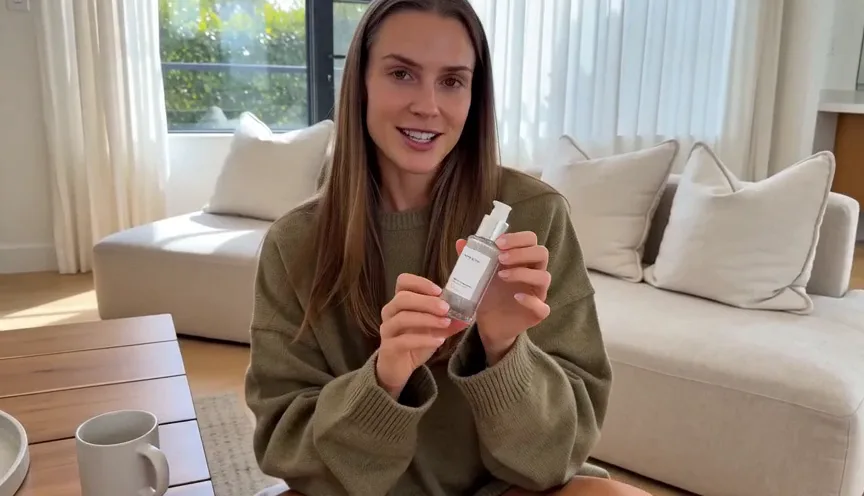
Seedance 2.5
The output reads like an uninterrupted creator testimonial, with stable identity, clothing, background, dialogue, and product demonstration in one continuous flow.
- Stable facial identity throughout the sequence
- Consistent clothing and living room background
- Smooth movement from speaking to product demonstration
- Strong fit for UGC ads and creator testimonials
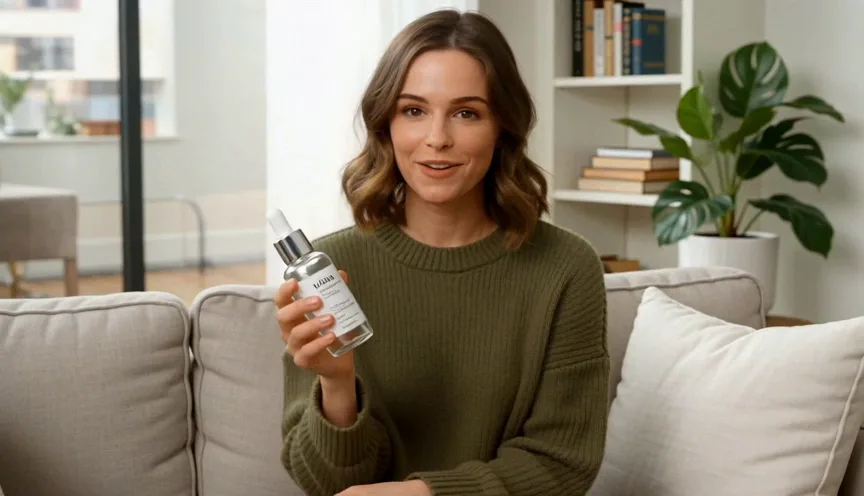
Veo 3.1
The output has strong facial realism and lighting, but a longer creator sequence usually needs extension points to be reviewed and hidden in editing.
- High facial realism and natural expression
- Convincing daylight and room detail
- Potential transition variation across extensions
- More cleanup may be needed for a final ad
Test 2: Premium Product Commercial
Animate a luxury product reference image into a premium commercial advertisement.
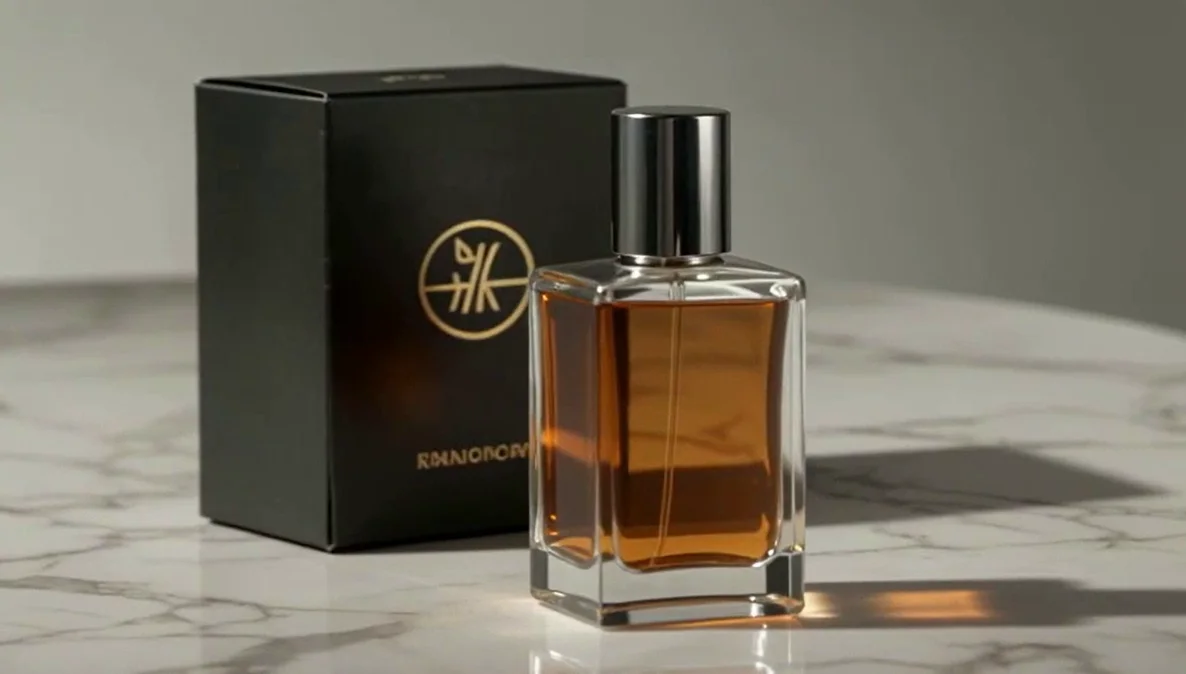
Shared prompt
Using the attached product reference image, generate a luxury commercial showing the product slowly rotating on a polished marble surface under cinematic studio lighting. The camera performs a smooth orbit while highlighting surface materials, reflections, and premium packaging details. Minimal background, no dialogue.
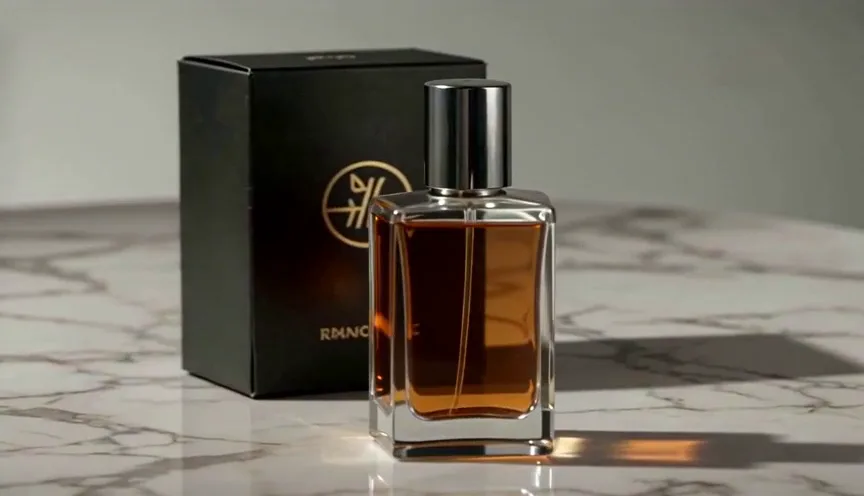
Seedance 2.5
The generated commercial keeps product proportions, logo placement, studio light, and packaging detail stable enough for ecommerce-style marketing.
- Strong reference-image fidelity
- Stable product proportions
- Smooth orbiting camera movement
- Better for controlled brand matching
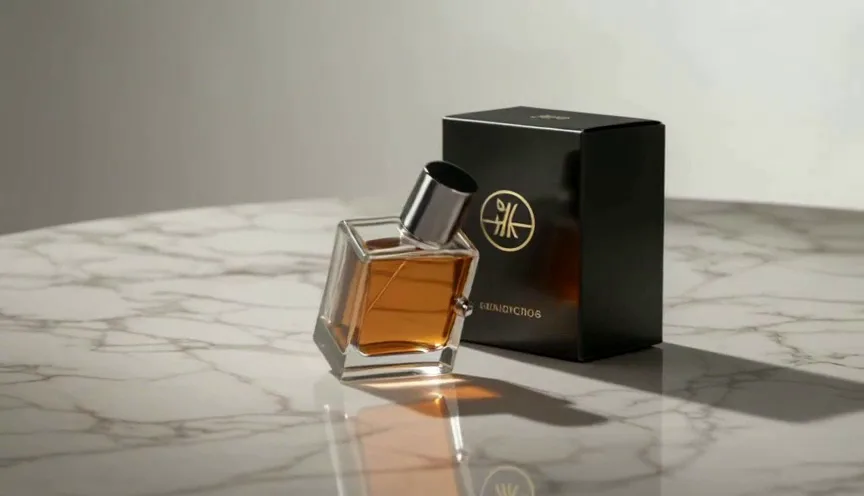
Veo 3.1
The output has polished reflections and cinematic lighting, with slightly more risk around small packaging details when exact matching matters.
- Beautiful cinematic reflections
- Strong material rendering
- Natural lighting transitions
- Better for luxury cinematic mood
Test 3: Luxury Automotive Commercial
Generate a premium automotive advertisement featuring dynamic vehicle movement and cinematic camera work.
Shared prompt
A silver electric sports car drives along a winding coastal highway at sunset. The sequence begins with a low front tracking shot before transitioning into a smooth aerial drone reveal above dramatic ocean cliffs. Warm golden-hour lighting, realistic reflections, premium automotive commercial style.
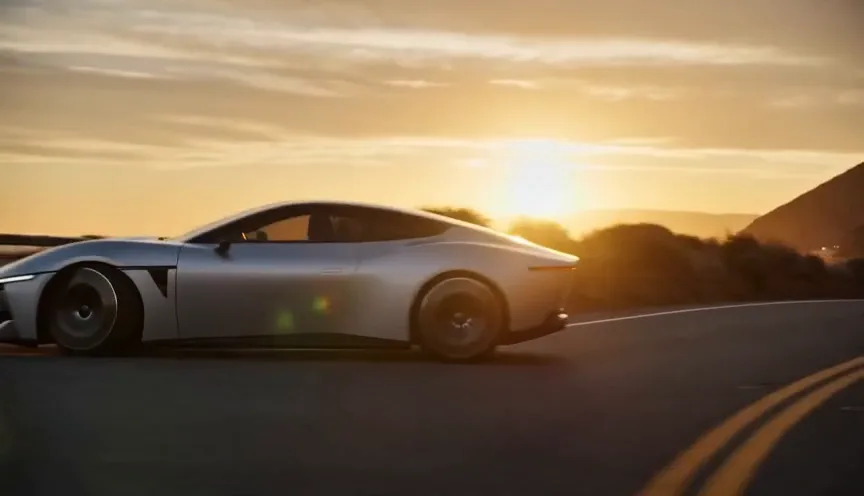
Seedance 2.5
The sequence feels storyboarded for a commercial, with stable vehicle proportions, consistent reflections, and reliable camera continuity.
- Stable vehicle proportions
- Smooth camera transitions
- Consistent body-panel reflections
- Strong prompt adherence
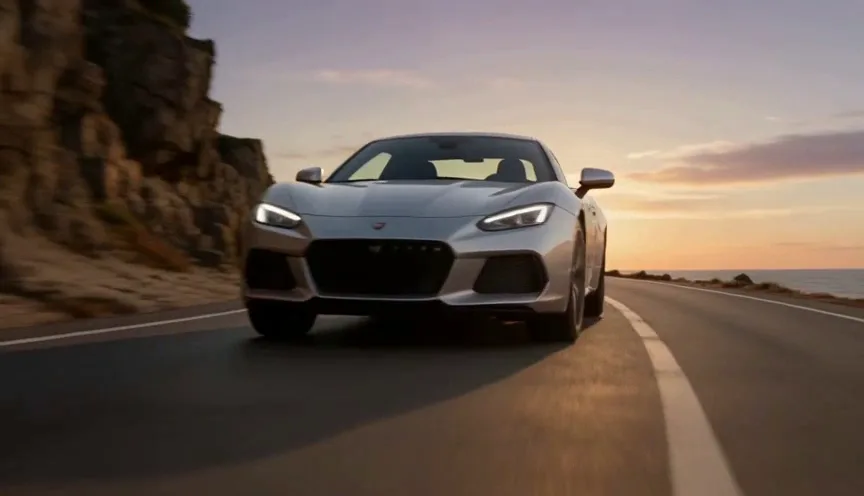
Veo 3.1
The vehicle movement and environment feel more physically grounded, especially in suspension, road contact, sunlight, and natural motion.
- More realistic suspension movement
- Better tire interaction with the road
- Convincing sunset reflections
- Strong physical realism
Test 4: Drone Landscape Documentary
Generate a cinematic aerial landscape similar to a professional travel documentary.
Shared prompt
A drone flies through a dense alpine forest before emerging above a crystal-clear mountain lake at sunrise. Soft morning fog drifts across the water while sunlight gradually illuminates the surrounding peaks. Slow cinematic drone movement with realistic environmental lighting.
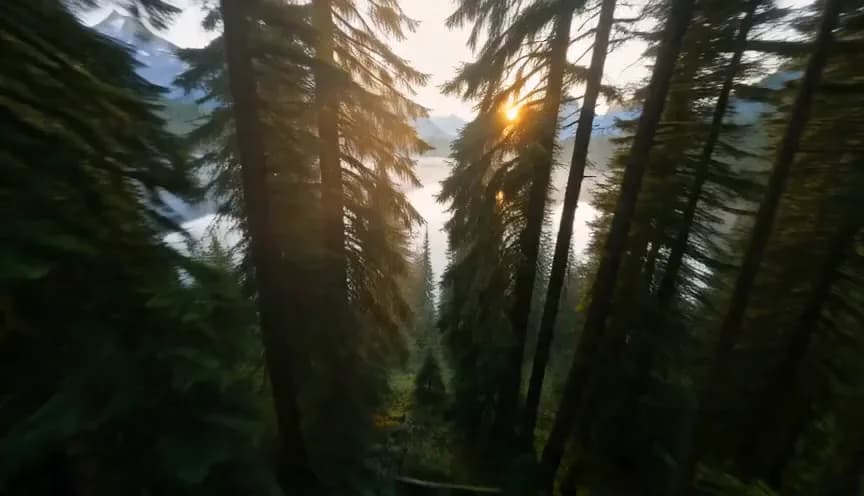
Seedance 2.5
The output has strong aerial continuity, a stable camera trajectory, and polished travel-ad composition.
- Stable aerial camera path
- Smooth lighting transitions
- Strong cinematic composition
- Predictable environmental rendering

Veo 3.1
The landscape feels more documentary-like, with stronger fog behavior, water reflection, atmospheric depth, and environmental motion.
- More realistic fog behavior
- Richer water reflections
- Better sunlight and haze interaction
- Stronger natural depth
A Note on Copyright and Content Policy
For commercial work, review generated content before publishing. Seedance outputs should be checked for brand accuracy, likeness rights, copyrighted characters, and platform ad rules. Veo 3.1 outputs include Google's provenance and safety framework in its ecosystem, but that does not remove the need for human review.
Which One Should You Actually Use?
Choose Seedance 2.5 for
- Creator ads and UGC-style product reviews
- 30-second story beats that should stay coherent
- Large reference sets and brand-controlled campaigns
- Commercial workflows where fewer stitched segments matter
Choose Veo 3.1 for
- Immediate Google ecosystem access
- Documentary-style landscapes and physical realism
- API billing with published per-second pricing
- Shot-by-shot extension and structural directing
For most commercial creators, the decision comes down to workflow rather than quality. Choose Seedance 2.5 for structured production pipelines. Choose Veo 3.1 for maximum cinematic realism and established access.
Frequently Asked Questions About Seedance 2.5 vs Veo 3.1
- Is Seedance 2.5 better than Veo 3.1?
- Not universally. Seedance 2.5 is stronger for native long-form continuity, larger reference sets, and creator workflows that need fewer stitched segments. Veo 3.1 is stronger for availability, Google ecosystem integration, and physically realistic cinematic scenes.
- Can I use Seedance 2.5 right now?
- Access depends on region and channel. ByteDance's own rollout has been staged, while this site provides Seedance 2.5 testing through credit-based access.
- Which model is cheaper?
- Veo 3.1 uses per-second pricing in Google API workflows. Seedance 2.5 access here uses one-time credit packs starting at $9.90, with cost per credit decreasing at higher tiers. The cheaper option depends on resolution, audio, and how many clips you need to regenerate.
- Which model has better character consistency?
- Seedance 2.5 has the broader stated reference capacity, which is useful for multi-character scenes, brand assets, and series content. Veo 3.1's reference workflow is simpler and can be enough when you only need to lock one subject or product.
- Which one is better for TikTok, Reels, or Shorts?
- Seedance 2.5 is attractive for short-form storytelling because a 30-second native single take can cover a complete beat. Veo 3.1 is attractive when you want established access, strong realism, and Google workflow integration.